
Most advice on contact center ai solutions starts in the wrong place. It starts with features.
That’s how leaders end up buying summarization, bots, routing, and agent copilots without fixing the operating conditions those tools depend on. The result is familiar. A polished pilot, weak adoption, long integration cycles, and an executive team wondering why the value case still feels theoretical.
Operators don’t need another feature checklist. They need a way to decide where AI belongs, what it should touch first, and what has to be true internally before any deployment can carry its own weight. In large environments, especially those spread across voice, digital, BPO, and regulated workflows, the difference between success and waste usually comes down to discipline, not novelty.
The Real State of Contact Center AI in 2026
The market signal is clear. Gartner projects that conversational AI deployments in contact centers will reduce global agent labor costs by $80 billion by 2026, reflecting a move toward AI-augmented operating models rather than purely agent-heavy ones, as summarized by Sprinklr’s review of the Gartner projection.
That doesn’t mean buying more AI features is the answer.
It means the financial pressure to act is real, while the failure mode is also real. Many leadership teams still evaluate contact center ai solutions the same way they evaluated legacy software. They compare feature grids, sit through demos, ask for pricing, and move straight to procurement. That approach breaks down fast with AI because performance depends on process design, knowledge quality, integration depth, governance, and management follow-through.
The leaders who get value out of AI usually do one thing differently. They treat AI as an operating model change, not a software add-on.
If you want a broader market view, your guide to the 2026 AI call center is useful context because it frames the category shift that operators are now being asked to manage. The harder part is internal. Most centers aren’t short on ideas. They’re short on sequencing.
Why feature-first buying fails
A bot can’t fix broken intents. Agent assist can’t compensate for a weak knowledge base. Automated QA won’t create coaching discipline where none exists. Summarization won’t save an operation whose after-call work is inflated by poor CRM design.
That’s the part vendors rarely lead with.
Practical rule: If a vendor conversation starts with capability before business problem, you’re already off track.
Leaders also need to separate urgency from readiness. AI is no longer a side topic, and the industry shift is obvious. But moving too early with the wrong foundation creates rework that costs more than waiting a quarter and cleaning up the basics first.
A useful starting point is this perspective on why most contact centers will still get agentic AI wrong. The core issue isn’t lack of ambition. It’s weak operational design wrapped in aggressive expectations.
What the pressure really means
For most VP and Director-level leaders, the question isn’t whether AI matters. It’s where to apply it without damaging service levels, agent confidence, or compliance posture.
That changes the evaluation lens:
- Start with failure demand: Look for repeat contacts, long handle drivers, and post-call admin drag.
- Protect the core: Keep complex judgment calls with experienced humans.
- Require proof in workflow: Don’t accept outputs that live in dashboards but never change frontline behavior.
The centers that win here won’t be the ones with the most AI. They’ll be the ones that match the right capability to the right operational problem, in the right order.
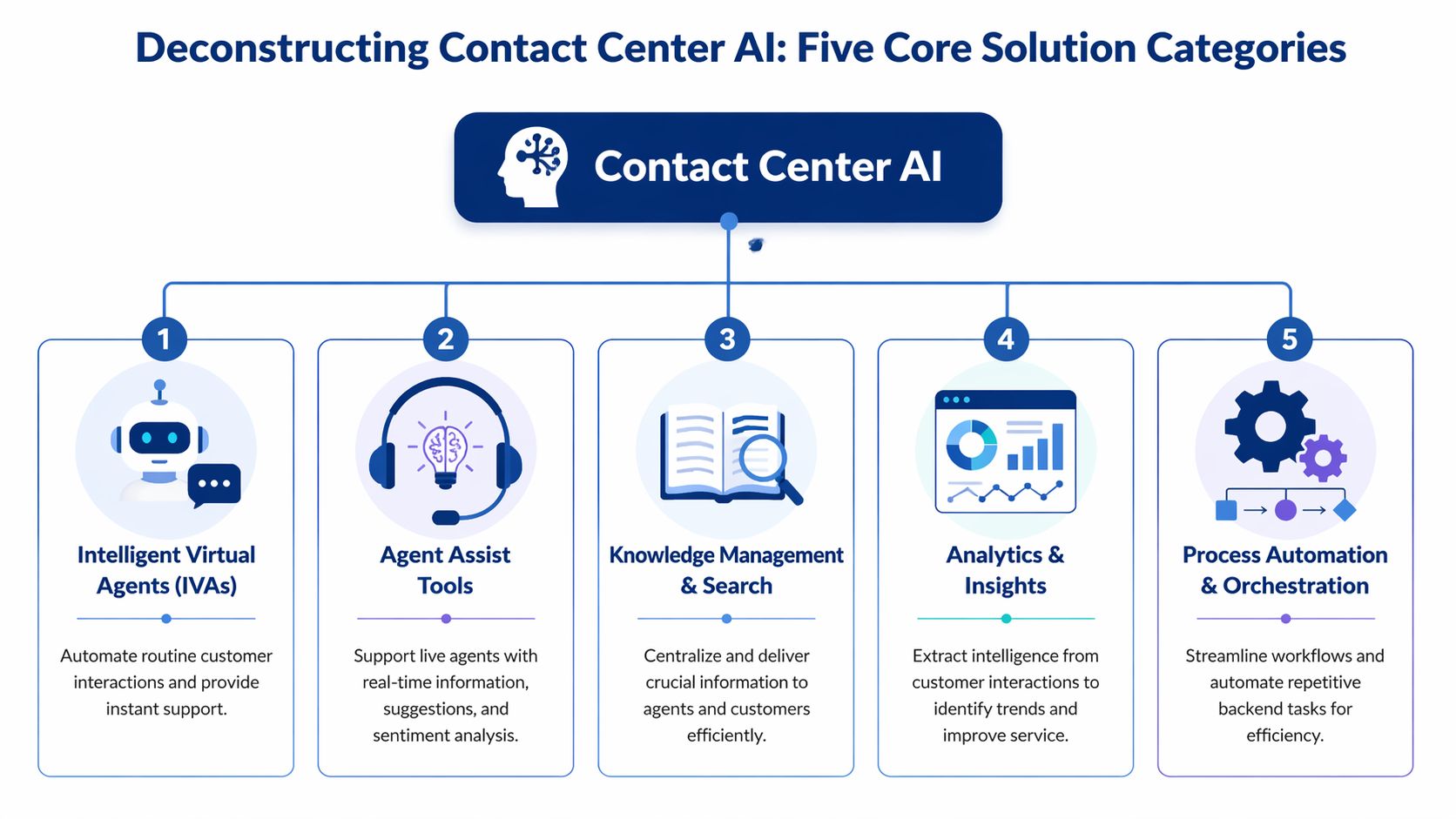
Deconstructing Contact Center AI The Five Core Solution Categories
“Contact center AI” is too broad to be useful on its own. In practice, leaders are usually evaluating five different solution categories that solve very different problems.
Intelligent virtual agents
This is the customer-facing layer. It covers chatbots, voicebots, and conversational self-service that handles routine tasks before an agent gets involved.
The operational question isn’t “Does the bot sound smart?” It’s “Which intents can we automate safely without creating more transfers, repeat contacts, or customer confusion?” IVAs work best when the use cases are narrow, repetitive, and well-defined. They struggle when business rules are inconsistent or back-end systems can’t complete the transaction cleanly.
A strong IVA program lowers friction for simple requests. A weak one just moves work from the front of the call to the middle of the call.
Agent assist tools
This is the category that tends to create value fastest because it supports live agents instead of trying to replace them. Real-time agent assist uses NLP to analyze live conversations and can reduce average handle time by 20 to 30 percent while cutting after-call work by 40 percent, according to Aircall’s overview of contact center AI solutions.
That sounds attractive, but the key test is workflow fit. Does the tool surface the right script, article, or next action at the right moment? Or does it become another pane of glass agents ignore?
If you want a plain-language example of what the category is meant to do in practice, Real-Time Agent Assistance gives a helpful framing. In operations, I’d define it more narrowly: agent assist should reduce searching, reduce hesitation, and improve consistency on complex calls.
Knowledge management and search
Many buyers treat knowledge as a side dependency. It’s not. It’s a core AI category because most assistive and self-service tools are only as good as the content they can retrieve and apply.
When knowledge is fragmented, AI spreads the fragmentation faster. When knowledge is governed well, AI shortens ramp time and reduces policy drift across sites and channels.
A few signs this category matters more than leaders expect:
- High hold behavior: Agents still pause to hunt for answers.
- Version confusion: Teams follow different procedures for the same issue.
- Supervisor dependency: Frontline staff rely on floor support for routine judgment calls.
Analytics and insights
This category includes speech analytics, interaction analytics, sentiment analysis, and automated quality review. It’s the layer that tells you what’s happening across the operation, not just what your dashboards say should be happening.
The key distinction is between data visibility and usable insight. A lot of tools can transcribe calls and produce themes. Fewer can translate those themes into coaching, policy correction, root cause analysis, and routing changes.
Analytics is valuable when it changes a manager’s next action. If it only creates a better dashboard, it’s reporting.
This category is often the best first AI investment because it helps leaders see repeat failure patterns before they automate anything.
Process automation and orchestration
This is the back-office and workflow layer. It includes automation for wrap-up tasks, case creation, summaries, tagging, follow-up actions, and handoffs across systems.
Done well, this removes admin work agents shouldn’t be doing manually. Done poorly, it inserts AI into broken workflows and hard-codes confusion at scale.
Here’s how I think about the five categories in operator terms:
| Category | Primary job | Common risk |
|---|---|---|
| Intelligent virtual agents | Handle routine customer interactions | Automating poorly defined intents |
| Agent assist tools | Improve live call execution | Prompt overload or weak relevance |
| Knowledge management and search | Deliver trusted answers fast | Outdated content surfaced confidently |
| Analytics and insights | Expose behavior and root causes | Insights that never trigger action |
| Process automation and orchestration | Remove repetitive manual work | Automating bad process design |
If your team is also reviewing broader stack decisions, this guide to omnichannel contact center solutions is the right adjacent conversation. AI categories don’t sit outside the stack. They sit inside routing, knowledge, QA, CRM, and workforce workflows.
The Real Business Case Moving Beyond Cost Savings
Most AI business cases are too narrow. They lead with labor savings because that gets attention in the first meeting. Then they fall apart when operators are asked how those savings will show up without hurting customer experience or increasing avoidable contacts elsewhere.
That’s why the better business case is a balanced one.

Start with first contact resolution
If a solution reduces cost but pushes customers into repeat contacts, you didn’t save money. You shifted it.
That’s why first-contact resolution is one of the clearest places to build the case. AI-driven tools in contact centers improve FCR by 15 to 25 percent through predictive analytics and real-time agent guidance, as described in Rezo.ai’s analysis of AI in call centers. From an operator’s standpoint, that matters because FCR connects efficiency, customer effort, and queue stability.
When FCR improves, a lot of secondary metrics move in the right direction. Repeat volume drops. Escalations ease. Supervisors spend less time cleaning up preventable misses.
Add agent and risk outcomes
A serious business case should include the metrics leaders usually leave for phase two.
Those include:
- Agent experience: If AI removes repetitive searching, repetitive note entry, and repetitive wrap-up work, agents have more capacity for judgment and empathy.
- Consistency: AI can narrow the spread between your strongest teams and your average teams when guidance is embedded in the workflow.
- Compliance posture: In regulated environments, real-time prompts and automated review can reduce exposure by catching missed steps earlier.
- Management effectiveness: Supervisors can spend less time sampling and more time coaching specific behaviors.
Weak ROI models miss the point. They assume value comes only from shorter calls. In real operations, value often comes from fewer avoidable contacts, fewer preventable errors, and fewer hours wasted on low-value admin.
Use a scorecard, not a single promise
I’ve seen more than one deployment lose executive support because the sponsor promised one headline metric and ignored everything else. AI doesn’t need a heroic claim. It needs a measurable operating thesis.
A practical scorecard looks like this:
| KPI area | What to watch |
|---|---|
| Customer outcomes | FCR, escalation patterns, customer effort signals |
| Agent outcomes | Search time, after-call burden, adoption, coaching needs |
| Operational outcomes | Queue stability, repeat contact drivers, handle variability |
| Risk outcomes | Script adherence, policy misses, documentation quality |
What works: Tie every AI use case to one primary metric and one protection metric. For example, reduce handle burden while protecting FCR. Improve self-service while protecting escalation quality.
That discipline matters in board discussions too. Executives will listen to efficiency. They’ll approve faster when you show how AI supports service quality, resilience, and control at the same time.
Cost matters. It just shouldn’t be the only story you tell.
Are You Operationally Ready A Pre-Flight Checklist
The largest gap in most contact center ai solutions conversations is readiness. Not technical readiness on a slide. Operational readiness in the very environment your supervisors, analysts, trainers, QA leads, and agents operate.

At this point, programs stall.
Many contact centers require large volumes of high-quality data for AI to function, yet many struggle with data management and siloed systems. Emerging data shows 40% of enterprises delay ROI by 6-12 months because of those data quality and integration hurdles, according to Meridian IT’s review of implementation challenges.
That lines up with what operators see on the ground. AI doesn’t fail only because the model is weak. It fails because the inputs, process rules, and handoffs are inconsistent.
The checklist leaders should use before vendor demos
Run these checks before you shortlist anything.
- Data accessibility: Can your interaction data, CRM records, QA results, and knowledge content be connected without manual patchwork?
- Process clarity: Are your top call types documented well enough that an outsider could follow them without tribal knowledge?
- Knowledge quality: Do agents trust the current knowledge base, or do they bypass it and ask peers?
- Decision rights: Does anyone own prompt governance, model output review, and policy signoff?
- Frontline management capacity: Can supervisors absorb new coaching and change-management work, or are they already overextended?
If the answer to several of these is no, the right move may be sequencing, not speed.
Where readiness usually breaks down
Most failures don’t start in the model. They start in one of three places.
First, legacy architecture. Voice data lives in one stack, digital data in another, QA data in spreadsheets, and process documentation in three different repositories. AI can connect to parts of this, but partial context creates partial value.
Second, undocumented exceptions. Leaders often believe a process is standardized because the SOP exists. Then the pilot starts and every site handles edge cases differently.
Third, weak governance. Teams deploy summarization or response generation without deciding who reviews output quality, who handles policy drift, and who owns updates when the business changes.
If your operation runs on workarounds, AI will learn the workarounds.
That’s why readiness work isn’t administrative overhead. It’s the value protection layer.
A simple red-yellow-green view
Use a blunt internal score before procurement begins.
| Area | Green looks like | Yellow looks like | Red looks like |
|---|---|---|---|
| Data | Core systems connected and usable | Partial integration with gaps | Heavy silos and manual exports |
| Process | Top journeys documented and current | Some standardization, many exceptions | Tribal knowledge drives execution |
| Knowledge | Trusted, governed content | Mixed quality across teams | Agents avoid the KB |
| Governance | Clear owners and review process | Ownership shared loosely | No one owns output quality |
A short discussion on readiness discipline is worth watching before a buying process starts:
What to fix first
Don’t try to clean everything at once. Pick the dependencies tied to the first use case you plan to launch.
If your first target is agent assist, fix knowledge governance and conversation tagging. If your first target is automated QA, focus on evaluation design and data mapping. If your first target is self-service, tighten intents and escalation paths.
That’s less exciting than a big rollout announcement. It’s also how operators avoid spending months proving what should have been obvious at the start.
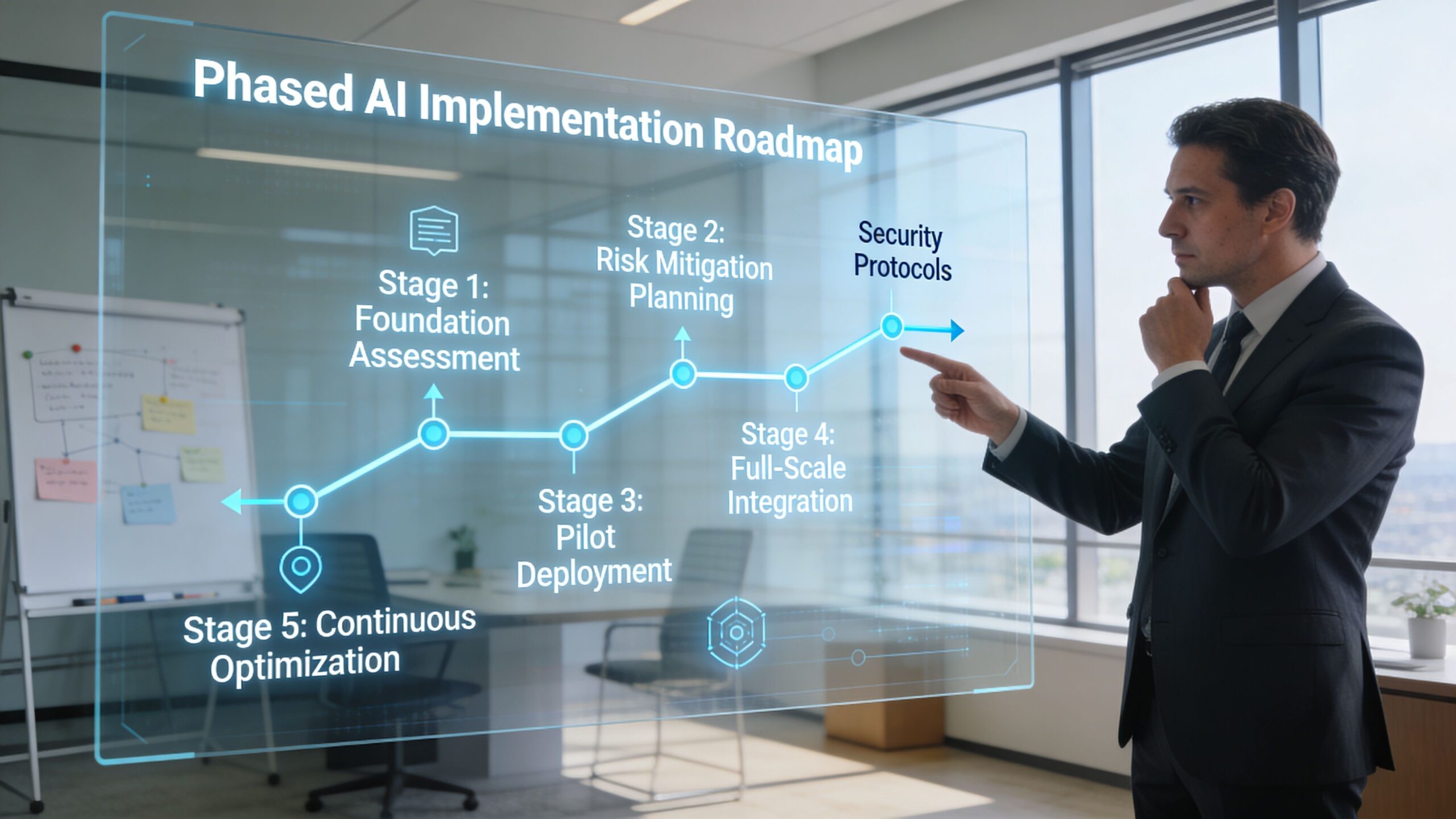
A Phased Implementation Roadmap That Protects Your Operation
The safest AI roadmap isn’t “buy the platform and turn on modules.” It’s staged maturity. Each phase should earn the right to the next one.
Phase one insight before intervention
Start with analytics, transcription, topic discovery, and automated review where appropriate. This phase helps you understand contact drivers, process breaks, coaching gaps, and compliance exposure before you put AI directly in front of agents or customers.
The benefit is simple. You learn where the operation is unstable while keeping service risk low.
This phase also creates cleaner requirements for later stages. Instead of saying “we want AI,” you can say “we need support on these call drivers, these wrap-up burdens, and these knowledge gaps.”
Phase two augment the frontline
Once you understand the work, move to agent-facing support. That usually means agent assist, summarization, knowledge surfacing, and workflow automation around after-call tasks.
Many centers ought to prioritize this aspect in their early stages. It improves execution without forcing customers into automation before the operation is ready.
But there’s an important condition. While AI handles transactions, humans remain essential for complex interactions. Aggressive AI migration without parallel investments in real-time coaching risks 20-30% agent burnout and up to 25% higher turnover, based on McKinsey’s contact center analysis.
That warning matters. When you remove simple contacts, the remaining work gets harder. If leaders don’t adjust coaching, staffing assumptions, and supervisor routines, agent load gets heavier even if volume looks more efficient on paper.
Phase three automate with guardrails
Customer-facing automation should come later, once the operation has stronger process control and cleaner escalation design.
That means:
- Tight intent selection: Automate routine work first, not emotionally charged or policy-heavy issues.
- Explicit escape paths: Customers must be able to reach the right human when automation stops helping.
- Closed-loop review: Analyze failed containment, repeat contacts, and handoff quality regularly.
- Role redesign: Shift supervisors and QA teams from sampling toward intervention and improvement.
The right sequence is insight, then augmentation, then automation. Inverting that sequence creates avoidable risk.
The maturity model most teams actually need
I’d frame the roadmap this way:
- See the work clearly through analytics and interaction review.
- Support the human workflow with assistive tools and cleaner knowledge delivery.
- Automate only what is stable after the process is understood and controlled.
That sequence protects service levels and gives the organization time to absorb change. It also creates more credible ROI because each phase produces evidence for the next one instead of forcing a multi-module bet upfront.
The operators who struggle with AI usually aren’t moving too slowly. They’re trying to automate a process they haven’t stabilized yet.
Vendor Selection Without The Hype A Practitioner's Procurement Guide
By the time evaluation teams reach procurement, they’ve already been shaped by vendor narratives. The demo looked polished. The roadmap sounded broad. The AI layer appeared to cover analytics, assist, automation, and QA in one package.
That’s exactly when discipline matters most.
After 4,000+ hours of vendor evaluation across 1,000+ vendors and 58 solution categories, one pattern shows up again and again. Good demos hide weak operating fit. Great procurement surfaces it early.
The questions that actually matter
Don’t start with “What features do you have?” Start with questions that expose how the system behaves inside your environment.
Ask things like:
- Integration depth: Which systems does the platform read from and write back to?
- Workflow fit: Does the output appear where agents and supervisors already work, or in a separate interface they must remember to open?
- Governance: How are prompts, summaries, categories, and policy rules updated over time?
- Exception handling: What happens when confidence is low, data is missing, or the workflow falls outside the model’s scope?
- Support model: Who helps after go-live when adoption stalls, outputs drift, or business rules change?
In regulated environments, add a tougher layer around data handling, auditability, and review controls. A vendor saying they “support compliance” isn’t enough. You need to know what is configurable, what is logged, and what your internal teams can verify.
Evaluate the operating model, not just the tool
A reliable vendor should be able to describe where their product fits and where it does not. Be careful with providers that claim to solve every use case equally well. Contact center ai solutions often span multiple categories, but depth varies.
I’d also push leaders to test three things during evaluation:
| Test area | What to look for |
|---|---|
| Relevance | Are outputs actually useful for your call types and workflows? |
| Adoption | Can frontline teams use it without extra friction? |
| Manageability | Can your team govern and improve it after launch? |
This is also where practitioner-led support can help. Technology procurement should reduce ambiguity, not just manage an RFP calendar. One option in the market is Cloud Tech Gurus, which supports vendor-neutral evaluation for contact center leaders and brings former operators into the process rather than treating selection as a sourcing exercise alone.
What experienced buyers ignore on purpose
They ignore logo slides. They ignore category inflation. They ignore promises that every module is “native” unless the integration model is clear.
They pay attention to referenceable workflow fit, implementation realities, data dependencies, and how much internal labor the solution will require after launch.
Procurement done well doesn’t just pick a product. It prevents the wrong kind of commitment.
Conclusion From Evaluation to Execution
The strongest contact center ai solutions programs don’t start with ambition. They start with control.
Control of the process. Control of the data. Control of the use case sequence. Control of how outputs will be reviewed, coached, and improved once the technology is live. That’s what separates a deployment that looks good in a steering committee from one that changes the operation in a durable way.
The pattern is consistent. Leaders get better outcomes when they break the category into clear solution types, build a business case around operational performance instead of cost alone, check readiness before they buy, phase implementation carefully, and run procurement with a skeptic’s eye.
AI can absolutely improve contact center operations. It can also magnify weak design. Technology doesn’t remove the need for operational discipline. It increases it.
Frequently Asked Questions About Contact Center AI
What’s the difference between AI and generative AI in the contact center
In practical terms, “AI” is the broader category. It includes routing logic, prediction, analytics, classification, and real-time guidance. Generative AI is the subset that creates something new, such as summaries, drafted responses, or suggested next steps.
That distinction matters in evaluation. A platform may have strong analytics AI but weak generative controls. Another may generate good summaries but offer limited operational insight. Don’t treat the labels as interchangeable.
How should leaders build an initial ROI case
Start with one use case and one operational pain point. Good starting points are after-call burden, knowledge search friction, repeat contacts, or QA coverage gaps.
Then define:
- Primary outcome: The main metric you expect to improve.
- Protection metric: The metric that must not degrade.
- Dependency list: The systems, content, and process conditions needed for success.
- Ownership: Who will govern output quality after launch.
That gives finance and operations something more useful than a broad automation promise.
Can legacy systems still support contact center ai solutions
Yes, but with limits. Legacy environments don’t automatically block AI. They do make integration, context sharing, and governance harder.
The issue usually isn’t age alone. It’s fragmentation. If voice, CRM, QA, and knowledge live in disconnected systems with inconsistent identifiers and manual exports, AI outputs will be partial and adoption will suffer. In those environments, a narrow use case with clear data dependencies is usually the smarter first move.
Should teams start with self-service or agent-facing AI
Most should start with agent-facing AI or analytics. It’s lower risk and exposes process issues before customers feel them directly.
Self-service belongs later for most organizations, once intents are stable, escalation paths are tight, and teams can monitor failure patterns closely.
How do you know a vendor is overselling
Watch for three signals. They can’t define the boundaries of their product clearly. They avoid detailed questions about data dependencies. They show outputs in a demo but can’t explain how managers, agents, and QA teams will use those outputs in daily workflow.
Cloud Tech Gurus provides vendor-neutral, practitioner-led consulting for contact center and CX leaders. Learn more at cloudtechgurus.com.